DV lottery photo examples: acceptable and unacceptable photos
A DV lottery entry photo follows the same standards as a US visa photo, and the State Department shows those standards on a page of sample photos marked acceptable or unacceptable. This guide quotes the captions from that page, grouped by topic, for the photo you upload with a DV entry.
DV entry photographs must meet the same standards as U.S. visa photos.If you are entering the Diversity Visa (DV) Program online, you must upload your digital image as part of your entry. Your digital image must be:Each boxed passage below is a quote, shown exactly as the State Department words it. The sample photos themselves are on the State Department's examples page: follow the source link under any caption to see them. We do not copy those photos here. The captions speak of "the customer" because the page was written for photo services. The plain text around the quotes is ours.
Two DV photos and what our check found
These two photos are AI-generated, not of real people. Each card shows some of the rules from the result our DV check recorded for it, as they appeared in that result.

US DV Lottery Photo
No rule failed
16 rules passed
AI-generated example
- Square, 600 × 600 pixelsFixed in the prepared file
- File size, 240 kB or lessFixed in the prepared file
- Head sizePasses
- Eyes open and visiblePasses
- Taken in the last 6 monthsTo confirm
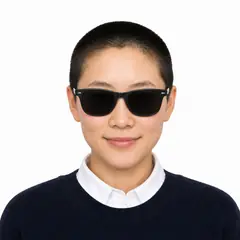
US DV Lottery Photo
3 rules need a new photo
12 rules passed
AI-generated example
- No glassesChange thisTake off your glasses for the photo.
- Eyes open and visibleChange thisTake off sunglasses and tinted glasses so both eyes are clearly visible.
- Head sizePasses
- Facing the cameraPasses
The first photo is larger than 600 × 600 pixels and 240 kB, so the prepared file crops it, resizes it to 600 × 600 and saves it as a smaller JPEG. The second fails because of the sunglasses.
Background
Acceptable - The background is white or off-white, without shadows, and is plain without texture, objects, or lines.Unacceptable - The background is not plain and has texture and lines.Unacceptable - The background is blue.Unacceptable - The background is not plain, and is not white or off-white.Light and color
Acceptable - The image is clear, reproduces skin tones accurately, and does not have shadows.Unacceptable - The photo includes shadows on the customer's face and background.Unacceptable - The color is not accurateUnacceptable - Photo is underexposedPose and expression
Acceptable - The customer is directly facing the camera with a neutral expression. Eyes are clearly visible.Unacceptable - The customer is looking down, and the head is tilted forward.Unacceptable - The customer's head is rotated, and the shoulders are not square to the camera.Unacceptable - The customer's head is tilted to the side.Unacceptable - The customer's facial expression is not neutralUnacceptable - The customer's eyes are closed.Your pupils and irises (colored portions of the eyes) must be clearly visible.Glasses
Starting November 1, 2016, eye glasses will no longer be allowed in new visa photos.Acceptable - The customer's full face is visible in the image. The customer is not wearing glasses.Unacceptable - Take off your glasses and make sure they are not resting on your head.Unacceptable - Take off your sunglasses before you get a photo.The DV instructions put it in four words:
Do not wear eyeglasses.Hats and head coverings
Unacceptable - Take off your hat before you get a photo.Unacceptable - The customer's head covering blocks part of the face, and there are shadows on the face.The examples page also describes exceptions for head coverings, in words that differ from the DV instructions. For a DV entry, this is the DV instructions' rule:
Do not wear a hat or head covering that obscures the hair or hairline, unless worn daily for a religious purpose. Your full face must be visible, and the head covering must not cast any shadows on your face.Our check cannot pass a photo with anything on the head, so it does not cover a head covering worn for a religious purpose.
The face must be visible
Acceptable - The customer's full face is visible, and no shadows or clothing block the face.Unacceptable - The customer's scarf covers a portion of the face.Unacceptable - The customer's hair blocks a portion of the face.Head size and position
Acceptable - The head is centered and the correct size.Unacceptable - The camera is too close to the customer.Unacceptable - The customer's head size is too small in photo.Unacceptable - The customer's head is not centered properly in the photo.Unacceptable - The customer's full head is not in the photo.Your hair may extend past the boundaries of the photo, as long as your entire head is shown and is the appropriate size.For the head size of a DV file in pixels, see our guide to the DV photo size.
Sharpness and red eye
Unacceptable - The photo is blurry.Unacceptable - The photo appears grainy.Unacceptable - The image has "red eye"Take a new photo without "red eye."Edited photos
Acceptable - The image is an original image that has not been changed.Unacceptable - The image appears to be edited and is using filters that make it different than an original image.Unacceptable - The image has been digitally changed to appear thinner.Unacceptable - The background is cropped using a photo retouching tool, changing the outline of the head, face, and neck.Do not change the shape of your head or face.For a DV entry, the instructions add what an edited photo can cost:
You may be ineligible for a DV if the entry photographs for you and your family members do not fully meet these specifications or have been manipulated in any way.Our guide to the photo mistakes that can make you ineligible covers this in more detail.
Copies of other photos
Photos copied or digitally scanned from driver's licenses or other official documents are not acceptable. In addition, snapshots, magazine photos, low quality vending machine, and full-length photographs are not acceptable.Children
Acceptable - No other person is in the photo, and the child is facing the camera with eyes open.When taking a photo of your baby or toddler, no other person should be in the photo, and your child should be looking at the camera with his or her eyes open.Our guide to DV photos for children and family members has the rules for each person on the entry.
Want your photo checked?
Our free check reads your own photo against these rules and shows a card like the two above. If the photo only needs cropping, resizing or saving as a JPEG, it shows you the prepared 600 × 600 file with a watermark. If the photo passes, you can buy that file.
Check my photoSources
Our knowledge base for this page was last updated on October 18, 2026 from these pages:
- www.federalregister.gov/documents/2024/10/01/2024-22482/diversity-visa-instructions-for-dv-2026 (US Department of State), read on the page itself
- travel.state.gov/content/travel/en/us-visas/visa-information-resources/photos.html (US Department of State), read on the page itself
- travel.state.gov/content/travel/en/us-visas/visa-information-resources/photos/photo-examples.html (US Department of State), read on the page itself
Each quote on this page is shown word for word as it appears in the copy named here.